Keep Tabs on Your Whole Roster — Introducing WoW Tracker
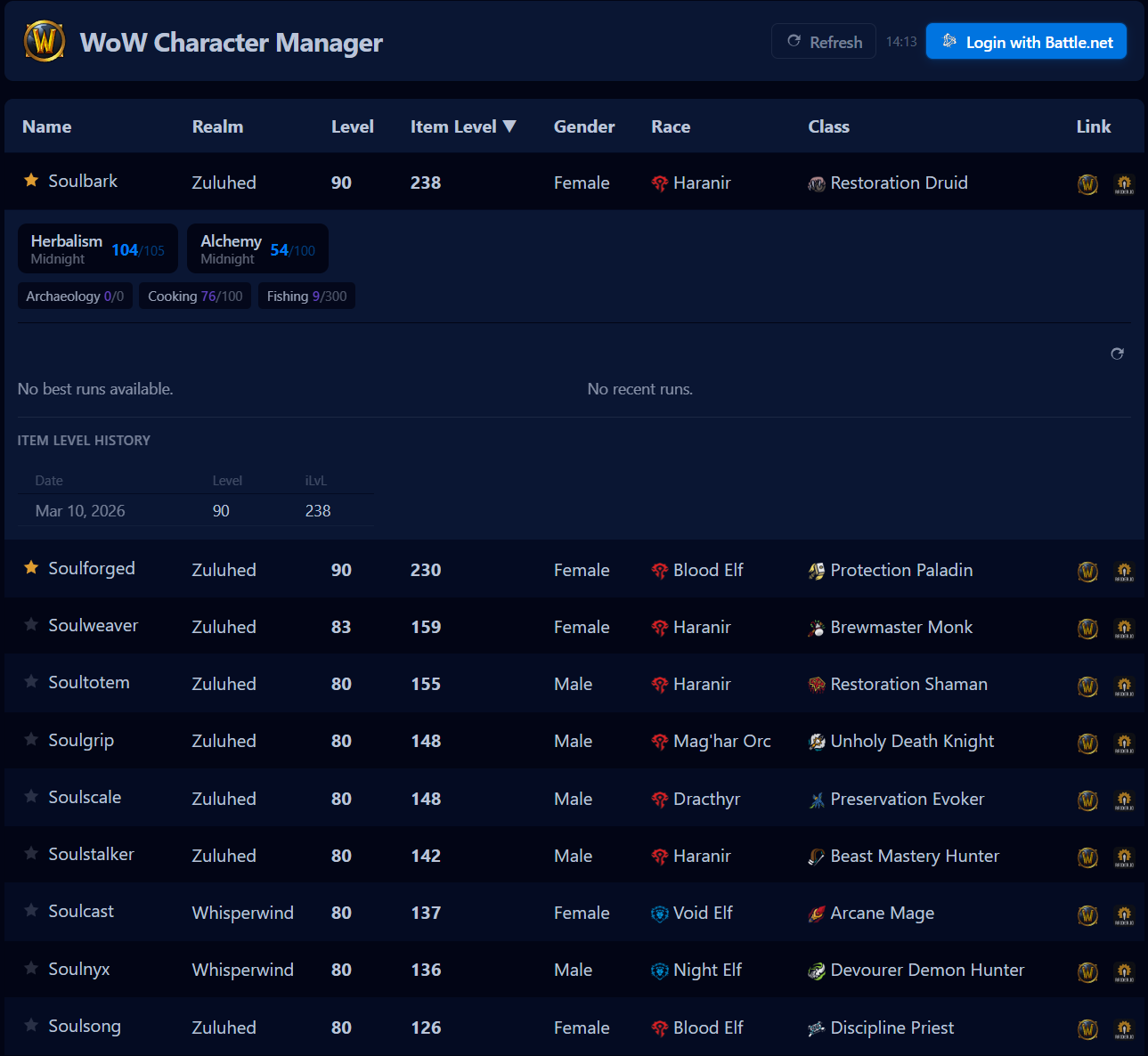
If you've been playing World of Warcraft for more than a few years, there's a decent chance you've got a small army of alts scattered across multiple realms. Maybe you're a raider with a main and a handful of backup characters. Maybe you're a Mythic+ grinder who swaps between specs depending on the week's affixes. Whatever your playstyle, keeping track of all your characters can feel like a second job.
I built WoW Tracker to solve that problem for myself — and it's gotten useful enough that I wanted to share it. You can try it at tracker.nolongervalid.com.
What It Does
You log in with your Battle.net account, and the app pulls in every WoW character you own. No manually adding characters, no typing in realm names. Just your full roster, laid out in a clean table you can sort and filter however you like.
At a glance you'll see each character's name, realm, level, item level, race, class, and spec — including faction and class icons so you know at a glance who you're looking at.
Click any character and the row expands to show the good stuff.
Raider.IO, Right There
Without leaving the page, you can see a character's Mythic+ rating, their four best runs of the season, recent dungeon history, and raid progression across Normal, Heroic, and Mythic. No more tabbing over to Raider.IO and searching by name — it's all one click away.
Track Gear Progression Over Time
This is the feature I use most. Every time your character list refreshes, the app compares the new item levels against the previous snapshot. If a character geared up, you'll see a green badge showing exactly how many item levels they gained. If somehow they went down (it happens), you'll see red.
Expand any character and there's a full history table showing their item level over the last ten snapshots. It's a simple way to see at a glance which alts are actually getting gearing attention and which ones you've been neglecting.
Profession Tracking
Expand a character and you'll also see their current professions, skill levels, and which expansion tier they're leveled in. Useful when you can't remember which alt has Midnight Blacksmithing maxed out.
Auto-Refresh and Favorites
The app refreshes your character data automatically every 30 minutes, with a live countdown so you always know when the next update is coming. You can also hit refresh manually any time.
Star your most important characters and they'll always sort to the top of the list. Favorites are saved locally in your browser, so they persist across sessions without needing an account or any extra setup.
Summary Stats
At the bottom of the page you'll see a quick summary: total characters, how many are max level, and average item level — both across your whole roster and just your max-level characters. A nice sanity check when you're deciding which alt to play next.
It started as a personal tool I threw together to scratch an itch, and it's been genuinely useful. If you're managing a big roster or just want one place to see everything across your characters, check it out at tracker.nolongervalid.com.